Ridge Regression#
Ridge is a type of regularized linear regression that adds an L2 penalty (squared magnitude of coefficients) to the loss function.
It helps control overfitting by shrinking coefficients.
Unlike Lasso, Ridge does not set coefficients to zero → all features are kept but with smaller weights.
The L2 Regularization Formula#
Ordinary Least Squares (OLS) minimizes:
Ridge Regression modifies it:
Where:
\(\lambda\) = regularization strength (hyperparameter).
\(\beta_j^2\) = squared coefficients (L2 penalty).
Intercept (\(\beta_0\)) is not penalized.
Effect of L2 Penalty#
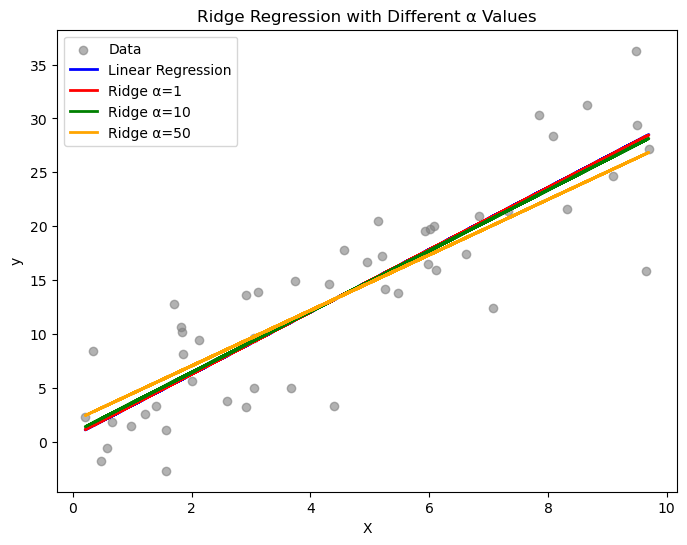
If λ = 0 → Ridge = OLS (no shrinkage).
If λ is small → coefficients shrink slightly.
If λ is large → coefficients shrink strongly but never reach exactly zero.
Why Ridge Never Zeros Out Coefficients#
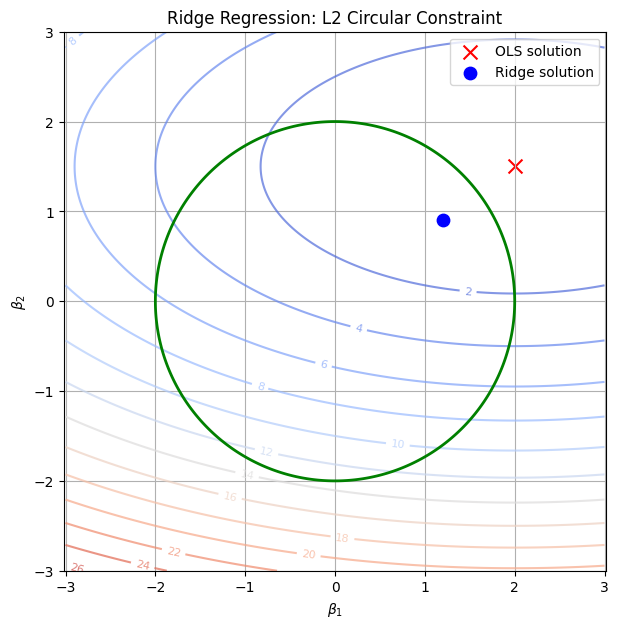
The L2 penalty creates a circular/elliptical constraint region.
Optimization prefers to spread weights across features instead of eliminating them.
So, Ridge is good when all features contribute a little.
When to Use Ridge#
✅ When you have multicollinearity (features are correlated). ✅ When you don’t want to remove features but want to reduce variance. ✅ Works best when many features have small to medium influence.
Visual Intuition#
Ridge forces coefficients to lie inside a circle (or sphere in higher dimensions).
Because circles have no sharp corners, coefficients get shrunk smoothly, never exactly zero.
Key difference vs Lasso (L1):
Ridge shrinks coefficients continuously but keeps all features.
Lasso can shrink some coefficients to exactly zero → feature selection.
import numpy as np
import matplotlib.pyplot as plt
from sklearn.linear_model import Ridge, LinearRegression

# Generate synthetic data
np.random.seed(42)
X = np.random.rand(50, 1) * 10
y = 3 * X.squeeze() + np.random.randn(50) * 5

# Fit Linear Regression (no regularization)
lin_reg = LinearRegression().fit(X, y)

# Fit Ridge Regression with different alpha values
ridge1 = Ridge(alpha=1).fit(X, y)
ridge10 = Ridge(alpha=10).fit(X, y)
ridge50 = Ridge(alpha=50).fit(X, y)

# Plot
plt.figure(figsize=(8,6))
plt.scatter(X, y, color="gray", alpha=0.6, label="Data")
plt.plot(X, lin_reg.predict(X), label="Linear Regression", color="blue", linewidth=2)
plt.plot(X, ridge1.predict(X), label="Ridge α=1", color="red", linewidth=2)
plt.plot(X, ridge10.predict(X), label="Ridge α=10", color="green", linewidth=2)
plt.plot(X, ridge50.predict(X), label="Ridge α=50", color="orange", linewidth=2)

plt.xlabel("X")
plt.ylabel("y")
plt.title("Ridge Regression with Different α Values")
plt.legend()
plt.show()
import numpy as np
import matplotlib.pyplot as plt
import warnings
warnings.filterwarnings("ignore")

# Create grid of coefficients
beta1 = np.linspace(-3, 3, 400)
beta2 = np.linspace(-3, 3, 400)
B1, B2 = np.meshgrid(beta1, beta2)

# Ridge constraint (circle): beta1^2 + beta2^2 <= t
circle = B1**2 + B2**2

# Example OLS solution (unregularized minimum)
ols_point = np.array([2.0, 1.5])

# Simulated contour of RSS (elliptical error surface)
rss = (B1 - ols_point[0])**2/4 + (B2 - ols_point[1])**2

plt.figure(figsize=(7,7))

# RSS contours
cs = plt.contour(B1, B2, rss, levels=15, cmap="coolwarm", alpha=0.7)
plt.clabel(cs, inline=1, fontsize=8)

# Ridge constraint region (circle)
plt.contour(B1, B2, circle, levels=[2**2], colors="green", linewidths=2, label="L2 constraint")

# Mark OLS solution
plt.scatter(*ols_point, color="red", marker="x", s=100, label="OLS solution")

# Approx Ridge solution (where ellipse first touches circle)
ridge_point = np.array([1.2, 0.9])
plt.scatter(*ridge_point, color="blue", marker="o", s=80, label="Ridge solution")

plt.xlabel(r"$\beta_1$")
plt.ylabel(r"$\beta_2$")
plt.title("Ridge Regression: L2 Circular Constraint")
plt.legend()
plt.grid(True)
plt.axis("equal")
plt.show()