

Handle Underfitting/Overfitting#
Handling Overfitting in DTC#
Pre-pruning (Early Stopping)
Limit tree complexity:
max_depth→ limit depth of the treemin_samples_split→ require more samples to splitmin_samples_leaf→ require more samples per leafmax_leaf_nodes→ restrict number of leaves
DecisionTreeClassifier(max_depth=5, min_samples_leaf=4)
Post-pruning (Cost Complexity Pruning)
Use
ccp_alphato prune weak branches.
DecisionTreeClassifier(ccp_alpha=0.01)
Reduce Noise in Data
Clean data, remove irrelevant features.
Use Ensemble Methods
Random Forests, Gradient Boosting (combine multiple trees).
Handling Underfitting in DTC#
Allow More Complexity
Increase depth & allow smaller splits:
DecisionTreeClassifier(max_depth=None, min_samples_split=2, min_samples_leaf=1)
Reduce Pruning Strength
Use smaller
ccp_alpha(closer to 0).
Feature Engineering
Add better features, encode categorical variables, transformations.
Check Data Quality
Underfitting often means the features don’t explain the target well → improve dataset.
Key Takeaway
Overfitting → model too complex → simplify the tree.
Underfitting → model too simple → allow more complexity.
Best practice: Use cross-validation + hyperparameter tuning (
GridSearchCV) to find the sweet spot.
Overfitting vs Underfitting in DTC
Case |
What Happens |
Symptoms |
Model Behavior |
|---|---|---|---|
Overfitting 🌳 |
Tree is too complex, memorizes training data |
Very high training accuracy, much lower test accuracy |
Poor generalization |
Underfitting 🌱 |
Tree is too simple, can’t capture patterns |
Both training & test accuracy are low |
Model is too weak |
import matplotlib.pyplot as plt
from sklearn.datasets import load_iris
from sklearn.model_selection import train_test_split
from sklearn.tree import DecisionTreeClassifier
from sklearn.metrics import accuracy_score

# Load dataset
X, y = load_iris(return_X_y=True)
X_train, X_test, y_train, y_test = train_test_split(X, y, test_size=0.3, random_state=42)

# Case 1: Underfitting (shallow tree)
dt_underfit = DecisionTreeClassifier(max_depth=1, random_state=42)
dt_underfit.fit(X_train, y_train)
train_acc_underfit = accuracy_score(y_train, dt_underfit.predict(X_train))
test_acc_underfit = accuracy_score(y_test, dt_underfit.predict(X_test))

# Case 2: Overfitting (deep tree, no restriction)
dt_overfit = DecisionTreeClassifier(max_depth=None, random_state=42)
dt_overfit.fit(X_train, y_train)
train_acc_overfit = accuracy_score(y_train, dt_overfit.predict(X_train))
test_acc_overfit = accuracy_score(y_test, dt_overfit.predict(X_test))

# Case 3: Balanced tree (tuned)
dt_balanced = DecisionTreeClassifier(max_depth=3, random_state=42)
dt_balanced.fit(X_train, y_train)
train_acc_balanced = accuracy_score(y_train, dt_balanced.predict(X_train))
test_acc_balanced = accuracy_score(y_test, dt_balanced.predict(X_test))

# Print results
print("=== Decision Tree Performance ===")
print(f"Underfitting (max_depth=1) → Train: {train_acc_underfit:.3f}, Test: {test_acc_underfit:.3f}")
print(f"Overfitting (max_depth=None) → Train: {train_acc_overfit:.3f}, Test: {test_acc_overfit:.3f}")
print(f"Balanced (max_depth=3) → Train: {train_acc_balanced:.3f}, Test: {test_acc_balanced:.3f}")

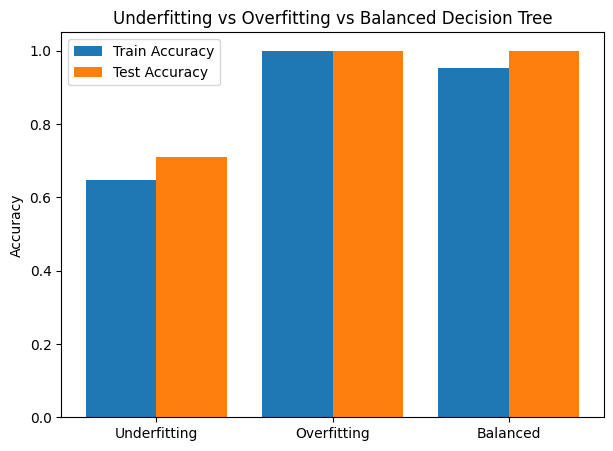
# Plot results
labels = ["Underfitting", "Overfitting", "Balanced"]
train_scores = [train_acc_underfit, train_acc_overfit, train_acc_balanced]
test_scores = [test_acc_underfit, test_acc_overfit, test_acc_balanced]

x = range(len(labels))
plt.figure(figsize=(7,5))
plt.bar(x, train_scores, width=0.4, label="Train Accuracy", align="center")
plt.bar([i + 0.4 for i in x], test_scores, width=0.4, label="Test Accuracy", align="center")
plt.xticks([i + 0.2 for i in x], labels)
plt.ylabel("Accuracy")
plt.title("Underfitting vs Overfitting vs Balanced Decision Tree")
plt.legend()
plt.ylim(0, 1.05)
plt.show()
=== Decision Tree Performance ===
Underfitting (max_depth=1) → Train: 0.648, Test: 0.711
Overfitting (max_depth=None) → Train: 1.000, Test: 1.000
Balanced (max_depth=3) → Train: 0.952, Test: 1.000
The Kernel crashed while executing code in the current cell or a previous cell.

Please review the code in the cell(s) to identify a possible cause of the failure.

Click <a href='https://aka.ms/vscodeJupyterKernelCrash'>here</a> for more info.

View Jupyter <a href='command:jupyter.viewOutput'>log</a> for further details.